
From Ambiguity to Sprint: How I Turn a Scattered Founder Conversation Into Something Buildable
Problem framing, deliberate scoping, and explicit tradeoffs — the PM loop that actually ships
March 2026 · 8 min read
github.com/PdroBrandao/ambiguity-to-sprint →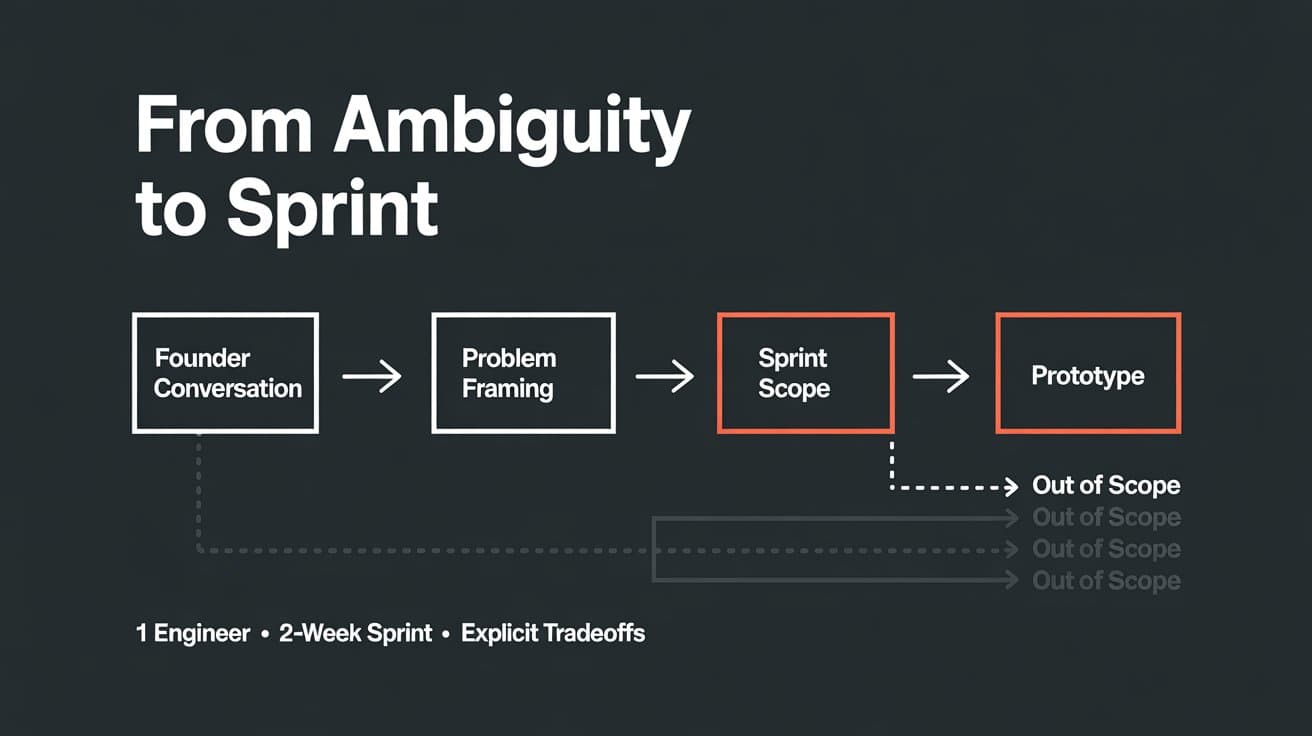
Full Repository + Working Prototype
https://github.com/PdroBrandao/ambiguity-to-sprint
I received a take-home challenge for an AI Product Manager role at an American company. The brief was simple: take a fuzzy founder vision and turn it into something clear, scoped, and buildable.
The constraint: one full-stack engineer, two-week sprints.
The deliverable: a clickable prototype of Sprint 1, a phased roadmap, and a 10-minute video presenting it to the client as if it were a real engagement.
This is the PM loop I ran — and why the decisions I made about what not to build matter more than the ones about what to build.
The Situation
The fictional client — let's call her Alex — runs a medical supply distribution company. Her team manages patient orders through a massive Excel spreadsheet. The flow: a physical therapy clinic sends an order for a lymphedema or post-mastectomy patient, Alex's team enters everything manually, calculates margins, runs insurance verifications, generates documents, and drop ships to the patient.
It works. But barely.
Here is an excerpt from the intake conversation:
“It pulls from three or four hidden tables — like fee schedules and product databases — to calculate everything. But it's fragile. If one field breaks, the whole sheet goes haywire.”
“When an employee fills out the form, most fields would auto-populate. All they'd need to enter is the patient info and select the items from a dropdown.”
“That's the dream. If the system could detect the vendor and send the order automatically to the right email — for example, if it's a Medi product, send the order to Medi — that would save a lot of time.”
She also mentioned three documents the system needs to generate: an encounter form, a patient invoice (with DocuSign + Stripe), and a proof of delivery. Plus a manager approval flow for certain HCPCS codes, measurement form uploads per line item, self-pay pricing, and prior authorization tracking.
That's a lot. Way too much for Sprint 1.
What She Asked For vs. What She Needed
Alex asked for a tool to replace Excel.
What she actually needed was a reliable calculation engine — a single source of truth for pricing logic that her team could trust without inspecting formulas.
The fragility she described isn't a UX problem. It's an architecture problem. Calculations live inside Excel formulas that depend on hidden reference tables. One broken cell cascades silently — no error, no alert, just wrong numbers sent to insurance.
Everything else she listed — the documents, the vendor routing, the approvals — those are workflow problems that sit downstream of the data. You can't generate a correct invoice from wrong data. You can't automate vendor routing if the product selection is unreliable.
Get the data right first. Everything else becomes easier.
How I Broke It Into Sprints
With one full-stack engineer and two-week sprints, the question isn't “what can we fit?” — it's “what's the one thing that, if we get it right, makes everything else easier?”
Sprint 1 — Smart Order Entry
The calculation engine. Replace the Excel input loop.
- → Patient + clinic lookup with auto-populated shipping and payer
- → Multi-line product selection: HCPCS, vendor, cost, billable price fill automatically
- → Self-pay toggle: switches pricing to MSRP automatically
- → Real-time financial preview: cost, billable, margin, patient owes
- → Inline warnings: manager approval required, measurement form needed, low margin
- → Visible fallback when fee schedule is missing — instead of silent wrong numbers
Sprint 2 — Document Generation
Turn a saved order into the three documents: encounter form, patient invoice with Stripe link, proof of delivery. PDF export. No DocuSign yet.
Sprint 3 — Approvals + Integrations
Manager approval workflow, DocuSign, automatic vendor email routing by product, prior authorization tracking, post-shipment order status.
Why This Sequencing
The temptation is to build end-to-end in Sprint 1 — intake, documents, approvals, everything. That's how you deliver a system that does everything halfway.
Sequencing by data trust → workflow → automation means Sprint 1 gives the team something usable immediately. Sprint 2 has reliable data to generate correct documents from. Sprint 3 automates confidently because the data model is proven.
If you start with Sprint 3 and the pricing logic is wrong, you're automating errors at scale.
What Was Explicitly Left Out of Sprint 1
This list matters as much as the feature list. It's what makes a Sprint 1 actually deliverable:
- ✕ PDF / document generation
- ✕ Manager approval workflow
- ✕ DocuSign / Stripe API integration
- ✕ Automated vendor routing
- ✕ Measurement form uploads
- ✕ Prior authorization tracking
- ✕ Reference table management UI (mocked in Sprint 1)
The Prototype
Instead of building in Figma, I built a working Next.js prototype. It covers every feature in Sprint 1 scope — real calculations, real routing logic, real data model. Mock data is pre-loaded with realistic products (HCPCS codes, fee schedules by payer), clinics, and patients.
The reason: a running prototype is a better communication tool than a Figma file when you can explain every decision in the code. And for an AI PM role, showing you can move between product thinking and technical execution is the point.
Try this flow in the prototype:
- Go to New Order
- Select a patient → clinic, therapist, and shipping address auto-populate
- Add a product → HCPCS, vendor, cost, and billable price fill in automatically
- Switch to self-pay → financial preview recalculates using MSRP
- Add the lymphedema pump (E0650) → manager approval warning appears
- Save the order → appears in the list immediately
What I Would Do Differently
Honest retrospective — the decisions I'd revisit:
The self-pay toggle conflates two things
Whether a patient has insurance and whether we're billing insurance for this specific order can diverge. A more precise model separates insuranceOnFile from billingMode. I'd design for this from day one.
Fee schedules should be editable without a deploy
In the prototype they're hardcoded. In production this is Sprint 3's admin panel — but the data model should anticipate it from Sprint 1, not bolt it on later.
The order status flow is too flat
Draft → Ready to Process works for Sprint 1, but the real flow needs Draft → Pending Approval → Approved → Ordered → Shipped → Delivered. Model it as a state machine early, or you're refactoring it in Sprint 3.
How I Used AI in This Challenge
I used Claude (Cursor) throughout — to pressure-test scope decisions, sanity-check the data model, and build the prototype faster.
The interesting part wasn't code generation. It was using multiple models (GPT-4, Gemini, Grok) to critique the roadmap and find blind spots before writing a single line of code. Each model flagged different issues. GPT-4 pushed for a “vertical slice” that closed the full cycle in Sprint 1 — I disagreed and held the line. Gemini flagged the self-pay toggle gap — I took it. Grok called the scope too ambitious — valid for production, not for a prototype.
The skill isn't prompting. It's knowing which feedback to absorb and which to ignore. That's the same skill you need when three stakeholders give you conflicting priorities on a real roadmap.
Treating AI as a panel of opinionated reviewers — not a code generator — cut at least a full day from the planning phase.